Cybersecurity Tools for Small Business That Actually Work
Cybersecurity tools for small business 2026: password managers, 2FA, backups, and endpoint protection that stop attacks on small companies, before they strike.
Arun Agarhari
Founder & Technical Systems Engineer
October 21, 2026 17 min read29.2k reads
Share
Glowing digital shield protecting a small business laptop and phone, cybersecurity tools for small business 2026
our password manager guidance now has its own full guide. If you are choosing between Bitwarden and 1Password for a small team, read /blog/password-managers-small-teams-2026 for the 2026 price comparison, the two week rollout plan, and the offboarding checklist that pairs with the stack above.
Key numbers at a glance
of cyberattacks target small businesses, per the Verizon breach report cited in the article
a month for the whole solo stack, less than a dollar a day
per user per month for a Bitwarden business plan with shared vaults
for a YubiKey security key, the strongest second factor
a year for Bitdefender Small Office Security, covering up to 10 devices
backup rule: three copies, on two kinds of storage, with one offsite
for 1Password Teams, the smoother product most small teams actually stick with, against $3 to $5 for Bitwarden business plans.
for Backblaze Personal unlimited backup, which just works in the background and is the cheapest real backup on the stack.
is Bitwarden Premium for individuals, beside 3 to 5 dollars per user per month for business plans with shared vaults
is Mullvad for a solo founder on coffee-shop WiFi, with Proton VPN's free tier enough for light use
is what the stack costs for a team of five, shared vaults and a business backup plan included, still less than a dollar a day per person
is the 1Password family plan, covering a founder's whole household beside the $3.99 Teams plan
is the quote the free scan ends in, which makes it a sales call, not a finding
: modern endpoint protection watches behavior, not just known viruses, a program encrypting your files at 2 AM gets stopped even if nobody has seen that ransomware strain before
: your email provider's spam and phishing filters, which are better than they were, Google Workspace and Microsoft 365 both filter the bulk of it, which is one more reason to use a business email service instead of a free inbox for your company
: every laptop and phone that touches your business needs real protection, not just the free antivirus that came with the operating system, and Bitdefender Small Office Security covers up to 10 devices for about $70 a year and consistently tops independent tests
Last reviewed: November 2026.
October is Cybersecurity Awareness Month, which is a good excuse to finally do the thing you have been putting off. Not because hackers are suddenly interested in you. Because they always were.
Here is the number that should change your week: small businesses are the target of roughly 43 percent of cyberattacks, according to Verizon's long-running breach report, and most of those attacks are not sophisticated. They are automated scans, phishing emails, and password reuse, pointed at thousands of small companies at once. The attacker does not know your name. They do not need to.
The good news is the same as the bad news. The attacks are boring, which means the defenses are boring too. No security team required. No five-figure budget. Just a handful of tools, set up once, that close the doors the automated attacks walk through.
Here is the affordable cybersecurity tools stack for small business, in the order that matters.
Key Takeaways
October is Cybersecurity Awareness Month, which is a good excuse to finally do the thing you have been putting off
The good news is the same as the bad news
Here is the affordable cybersecurity tools stack for small business, in the order that matters
Why do small businesses get hit first?
an email or message that pretends to come from a trusted sender to trick you into revealing a password or clicking a malicious link.
Attackers go where the doors are open. A big company has a security team, an IT department, and lawyers. You have a laptop, a phone, and a to-do list that never ends. The math is obvious from their side.
Three facts set the stakes. First, the average cost of a data breach for a small business runs into tens of thousands of dollars, and a majority of small firms that suffer a major attack close within six months. Second, most breaches start with a human, not a hacker in a hoodie: a clicked link, a reused password, a fake invoice. Third, the attack surface of a modern small business is huge: email, a website, a payment processor, a cloud drive, three social accounts, and a phone full of customer conversations.
That sounds bleak. It is actually the reason this article is short. The same three entry points cause nearly every small business breach, so closing those three doors covers most of the risk.
The attacker does not know your name. Automated scans test thousands of small companies at once for open doors.
Tool 1: Why does everyone need a password manager today?
If you take one thing from this article, take this. Password reuse is the single most common way small business accounts get taken over. One breached site, one reused password, and the attacker owns your email, your store, and your bank login in that order.
A password manager fixes it by giving every account a long, random, unique password that you never have to remember. You remember one strong master password. The manager remembers the rest, and fills them in for you.
Bitwarden is the honest pick for small budgets: free for individuals, $10 a year for premium, and $3 to $5 per user per month for business plans with shared vaults. 1Password is the smoother product and the one most small teams actually stick with: $3.99 per user per month for Teams, with a family plan at $4.99 a month that covers a founder's whole household. Both are audited, both support passkeys, and both are a hundred times better than the spreadsheet of passwords I know some of you are still using.
The setup takes an afternoon. Install the app, import your saved browser passwords, then change the important ones first: email, bank, payment processor, domain registrar, cloud storage. Email first, always. Your email account is the master key to every password reset on the internet.
One strong master password. Every account gets a long random password you never have to remember.
Tool 2: Where should you turn on two-factor authentication?
a second check, usually a code from your phone or a physical security key, required in addition to your password when you sign in.
A password manager is half the defense. Two-factor authentication is the other half. Even if a password leaks, the attacker still needs the second factor, which lives on your phone.
The ranking, from strongest to weakest: security keys (a physical USB key like a YubiKey, about $25 to $55) are best for your most important accounts. Passkeys, the newer standard built into phones and browsers, are next and are rapidly becoming the default. Authenticator apps like Google Authenticator, Microsoft Authenticator, or Authy come next. SMS codes are last: better than nothing, but SIM-swap attacks make them the weakest option. If an account offers app-based codes or passkeys, use those instead of SMS.
The rule for a small business: two-factor on email, bank, payment processor, domain registrar, cloud storage, and every social account, before the end of this week. It takes about five minutes per account. The accounts that get attacked first are exactly the ones people leave unprotected because they are "not important." Your domain registrar is important. Losing it means losing your website and your email in one move.
Five minutes per account. Email, bank, payments, domain, and cloud first. Security keys for the crown jewels.
Tool 3: Defender for Business or CrowdStrike for Small Business
Every laptop and phone that touches your business needs real protection, not just the free antivirus that came with the operating system. Modern endpoint protection watches behavior, not just known viruses: a program encrypting your files at 2 AM gets stopped even if nobody has seen that ransomware strain before.
For a one-person business, the honest options: Microsoft Defender is built into Windows and is genuinely good now, far better than its reputation from a decade ago. Pair it with a paid plan only if you want the central dashboard. Bitdefender Small Office Security covers up to 10 devices for about $70 a year and consistently tops independent tests. For Macs, the same logic applies: macOS is not immune, and the same vendors cover it.
The part people skip: updates. Set every device to update automatically, operating system and apps. A shocking share of breaches exploit vulnerabilities that already had a patch available. The update you keep postponing is the open window.
Behavior-based protection stops ransomware it has never seen. Automatic updates close the windows patches already fixed.
Tool 4: What makes a backup actually restore?
Ransomware only works if losing your files hurts. Backups remove the leverage. But a backup you have never tested is a hope, not a backup.
The rule is 3-2-1: three copies of your data, on two different kinds of storage, with one offsite. For most small businesses that means: the original on your laptop, a local copy on an external drive, and an automatic cloud copy. Backblaze Personal is $9 a month per computer for unlimited backup, and it just works in the background. Google Drive, Dropbox, or iCloud cover the documents, but a true backup service covers everything, including the files you forgot existed.
Then the part that matters: restore one file, once a quarter, on purpose. Pick a random document, restore it, confirm it opens. The five minutes this takes is the difference between "we have backups" and "we have backups that work." Every founder who has lost a laptop the week before taxes will tell you the same thing.
Three copies, two kinds of storage, one offsite. Then restore one file a quarter, on purpose, to prove it works.
Tool 5: How do you stop phishing emails?
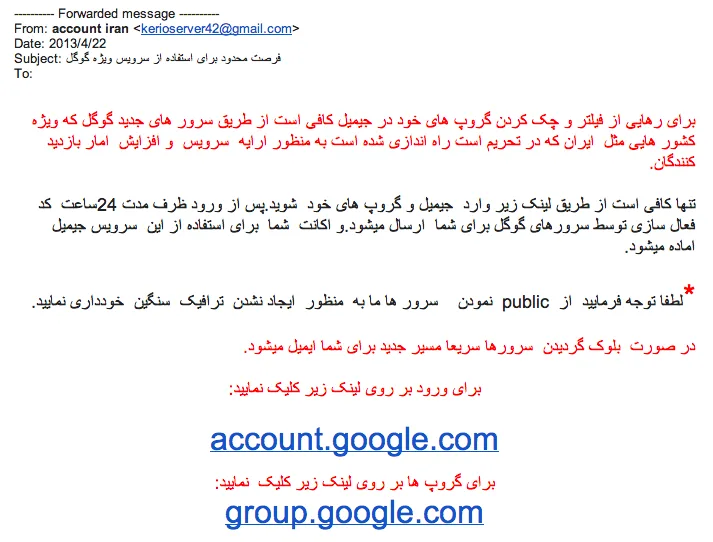
Phishing is still the number one way into a small business. Not the obvious Nigerian prince email. The fake invoice from a supplier you actually use, the password reset that looks exactly like Google, the "quick favor" from your own boss sent from a lookalike domain.
Three defenses stack up. First, your email provider's spam and phishing filters, which are better than they were: Google Workspace and Microsoft 365 both filter the bulk of it, which is one more reason to use a business email service instead of a free inbox for your company.
Second, domain authentication: SPF, DKIM, and DMARC records on your domain. These are DNS settings that tell the world which servers may send mail as you, and they stop attackers from spoofing your domain to your own customers. Your domain registrar or host can help set them up, and it takes about an hour. This is also the reason to read our email deliverability guide, because the same records improve whether your real emails reach the inbox.
Third, and cheapest: a rule for your team, even if the team is you. Any request involving money, passwords, or gift cards gets verified through a second channel. A phone call. A message on a different app. Never a reply to the same email thread. The five minutes that verification takes has saved more small businesses than any software on this list.
The fake invoice from a real supplier. Verify money requests through a second channel, every time.
Tool 6: How do you stay safe on WiFi anywhere?
Founders work from cafes, airports, and coworking spaces, which means business data travels over networks you do not control. A VPN encrypts that traffic. For a solo founder, a reputable consumer VPN (Mullvad at 5 euros a month, or Proton VPN's free tier for light use) is enough for the coffee-shop problem.
For a team, the better answer is a business VPN or a zero-trust tool like Cloudflare Access or Tailscale, which give each team member a private, encrypted route to company resources without routing all their personal traffic through the company. The principle is the same either way: never log into anything that matters over public WiFi without encryption, and never leave your laptop unlocked on a cafe table.
What do you do in the first hour of an incident?
Tools prevent most attacks. A plan handles the rest, because the worst time to figure out what to do is during the attack.
Write a one-page plan now, while nothing is on fire. It needs five things: who to call (your IT person, your bank, your hosting provider, your cyber insurance contact), how to cut access (change the email password first, then revoke sessions on every service), what to preserve (do not wipe anything before you know what happened), who to notify (customers, if their data was touched, and the timeline your state law requires), and where the backups are.
Print it. A plan stored on the laptop that just got encrypted is not a plan.
One more piece of the safety net: cyber insurance. A small business cyber policy often costs a few hundred dollars a year and covers breach response, legal costs, and notification expenses. It is not a substitute for the tools above, and insurers increasingly require them anyway. Read our cyber insurance guide to see what a policy actually covers before you buy.
Five things on one printed page: who to call, how to cut access, what to preserve, who to notify, where the backups are.
What to skip in 2026?
Three things small businesses keep buying that they do not need yet.
First, the expensive all-in-one security suite with a dashboard you will never open. A solo founder does not need enterprise security monitoring. The stack above covers the risk; the suite adds a bill.
Second, the security audit from a firm that found "critical issues" in every business it has ever looked at. If you want an audit, hire one with a fixed scope and a written report you own. The free scan that ends in a $5,000 quote is a sales call.
Third, biometric everything. Fingerprint and face unlock are fine conveniences, but they are not a security strategy. A fingerprint cannot be changed after a breach. Passwords plus a second factor remain the foundation.
What does the whole stack actually cost?
Tool
Monthly cost (solo)
Password manager
About $4
Authenticator app
Free
Endpoint protection
About $6
Cloud backup
$9
VPN
About $5
Solo total
About $24
Team of five
$15 to $20 per person
Add it up for a one-person business: password manager about $4 a month, authenticator free, endpoint protection about $6 a month, cloud backup $9 a month, VPN about $5 a month. Roughly $24 a month, less than a dollar a day, for a stack that stops the attacks that actually happen.
For a team of five, shared vaults and a business backup plan push it to roughly $15 to $20 per person per month. Still less than one hour of one employee's time. The security budget conversation gets easy when you frame it that way.
Start this week with the password manager and two-factor on your email. Next week, backups. The week after, the phishing rules. Cybersecurity Awareness Month ends October 31. Your protection should not.
Frequently asked questions
FAQ
QIs my small business really a target?
Yes, and not because of who you are. Automated attacks scan thousands of small businesses at once for known weaknesses: reused passwords, unpatched software, unprotected email. Small businesses are targeted precisely because they usually lack a security team.
QDo I need cyber insurance too?
It is worth pricing. A policy covers breach response, legal costs, and customer notification, often for a few hundred dollars a year. It does not replace the tools above, and most insurers now require a password manager and two-factor authentication before they will write a policy.
QWhat is the single most important step?
Unique passwords plus two-factor authentication on your email account. Your email controls password resets for nearly everything else. Secure it first and the rest of the stack gets much harder to attack.
QAre free security tools good enough?
For the basics, yes. Bitwarden free, Microsoft Defender, authenticator apps, and Proton VPN's free tier are all genuinely good. Pay when you need shared team features, central management, or unlimited backup. Free tools used consistently beat paid tools you never configure.
QWhat should I do if I think I have been hacked?
Change your email password from a clean device, revoke active sessions on your important accounts, call your bank if payment data was involved, and restore from backups rather than paying any ransom. Then work through the incident plan above and notify affected customers as your state law requires.
Best invoicing software for small businesses 2026: FreshBooks, Zoho Invoice, QuickBooks, Xero, Wave compared. Get paid faster with the right tool in 2026.
AI bookkeeping software compared for 2026: QuickBooks, Xero, Botkeeper, Docyt and more. Real pricing, what AI automates, and where humans still matter.
November Patch Tuesday 2026 fixed 1,000+ flaws, including an exploited Outlook zero-day. The patch order for small teams, the deadline, and the checklist.